Management software — CManager

A product developed by MonteiroLabs

CManager

Your works and business finances, in one place.

A web application for small contractors and renovation businesses. Create and share quotes with clients, track the status of each proposal and turn accepted quotes into works. Organise tasks, documents and your team. Record expenses and receipts to see what you have received, spent and still need to collect.

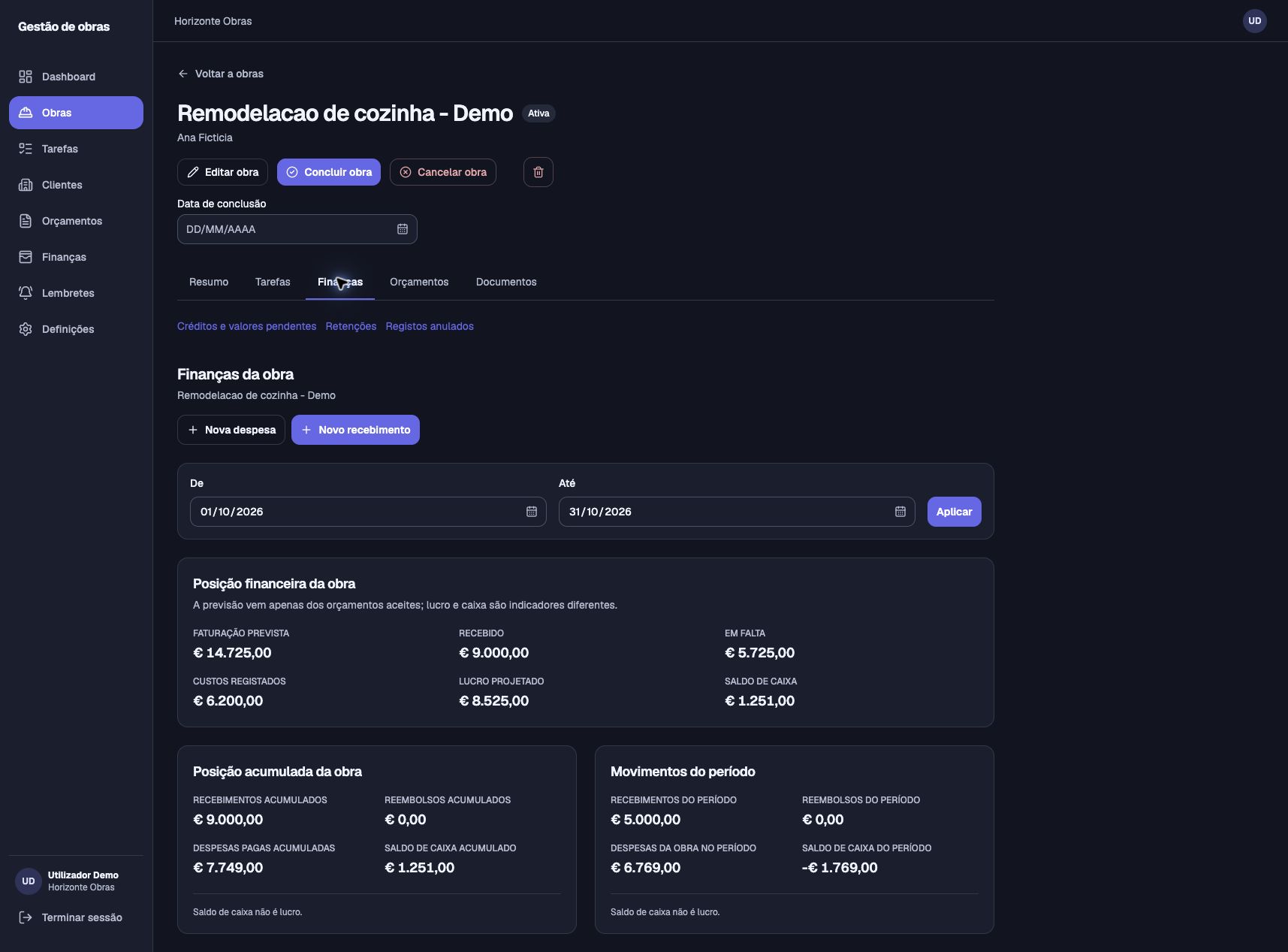
Work finances

What comes in, what goes out and what is still owed.

Track expenses and receipts for each work. See revenue projected from accepted quotes, recorded costs and outstanding amounts. Projected profit and cash balance are shown separately.

Real screenshot of work finances in CManager: projected revenue, receipts, outstanding amounts, costs, projected profit and cash balance. Demonstration data.
Work finances in CManager · Demonstration dataClick the image to enlarge

Everyday work

A clear view of every work.

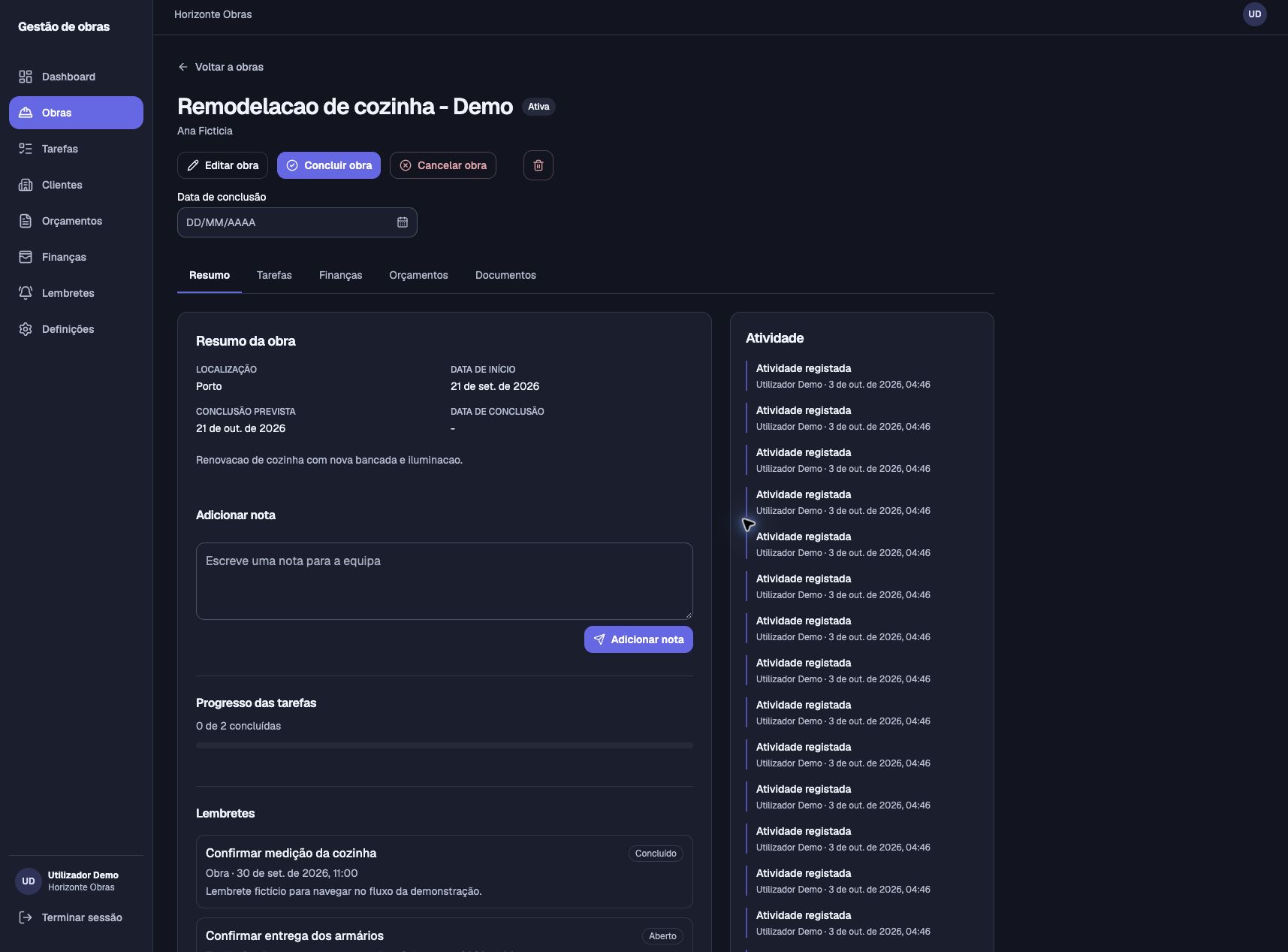
From the first record to completion, work information stays together so your team can follow progress and what comes next.

  • Work status, location and dates.
  • Shared notes and activity history.
  • Tasks and work progress.
  • Reminders linked to the work.
Real screenshot of a work summary in CManager: location, dates, team notes, task progress, reminders and activity. Demonstration data.
Work summary in CManager · Demonstration dataClick the image to enlarge

Team and records

Less repeated work. More working together.

Invite the people you work with and simplify expense entry. Two ways to keep information organised throughout the day.

Success depends on people

Your team, in the same space.

Invite employees and collaborators by email to join your company in CManager. Once they accept, they can work with the shared information.

  • Clients, works, tasks and quotes accessible to the team.
  • Documents and financial records within the company.
  • The owner manages invitations and removes access when needed.
  • Work history is retained when a member leaves.

Invoice QR scanning

Recording an invoice starts with a scan.

Use your phone camera to read the invoice’s fiscal QR code. CManager automatically fills in the available data, reducing manual expense entry.

  1. Scan the invoice’s QR code with your camera.
  2. Review the filled-in data and complete anything missing.
  3. Confirm and save the expense record.

You can also enter the data manually. Saving always requires your confirmation.

Work with other companies on the same work.

When you subcontract other companies that also use CManager, you can share the work with them, exchange documents and follow the progress of the work you have entrusted to them.

From quote to completion

The parts of your business, connected.

Works and tasks

Organise works by client and track status, dates, notes, tasks and reminders throughout delivery.

Clients and quotes

Keep client contacts and prepare quotes with services and materials, quantities, prices, discounts and taxes. Generate the PDF to share.

Expenses and receipts

Record movements linked to a work and follow your business finances. See projected, received and outstanding amounts, with costs, projected profit and cash shown separately.

Work documents

Keep photos, PDFs and other documents with each work, so you can find information without searching through conversations and scattered folders.

Discover CManager

A tool for the work you already do.

Open the application to explore CManager, or contact us to find out more about the product and MonteiroLabs.